Traces
Trace listing, detail views, JSON export, bulk deletion and request-log exclusion rules are
provided by the native_observability core module. The core module is a hard dependency of
every install tier (RAW, DASHBOARD, INTEGRATIONS). Enable it directly with
drush en native_observability -y, or install any preset (no:preset:raw,
no:preset:dashboard, no:preset:integrations), which pulls it in automatically.
Routes
| Route | Path | Permission |
|---|---|---|
native_observability.traces |
/admin/reports/native-observability |
view native observability traces |
native_observability.trace_view |
/admin/reports/native-observability/trace/{id} |
view native observability traces |
native_observability.trace_view_by_request_id |
/admin/reports/native-observability/trace/request/{request_id} |
access native observability |
native_observability.trace_export |
/admin/reports/native-observability/trace/{id}/export |
view native observability traces |
native_observability.traces_delete_all |
/admin/reports/native-observability/traces/delete-all |
delete all native observability traces |
native_observability.request_log_exclusion_list |
/admin/config/development/native-observability/exclusions |
administer native observability exclusions |
native_observability.request_log_exclusion_add |
/admin/config/development/native-observability/exclusions/add |
administer native observability exclusions |
native_observability.request_log_exclusion_edit |
/admin/config/development/native-observability/exclusions/{id}/edit |
administer native observability exclusions |
native_observability.request_log_exclusion_delete |
/admin/config/development/native-observability/exclusions/{id}/delete |
administer native observability exclusions |
Note that trace_view_by_request_id only requires access native observability, a lower bar
than trace_view, which requires view native observability traces. Grant permissions
accordingly if you link to traces by request ID from outside the traces list.
Trace list
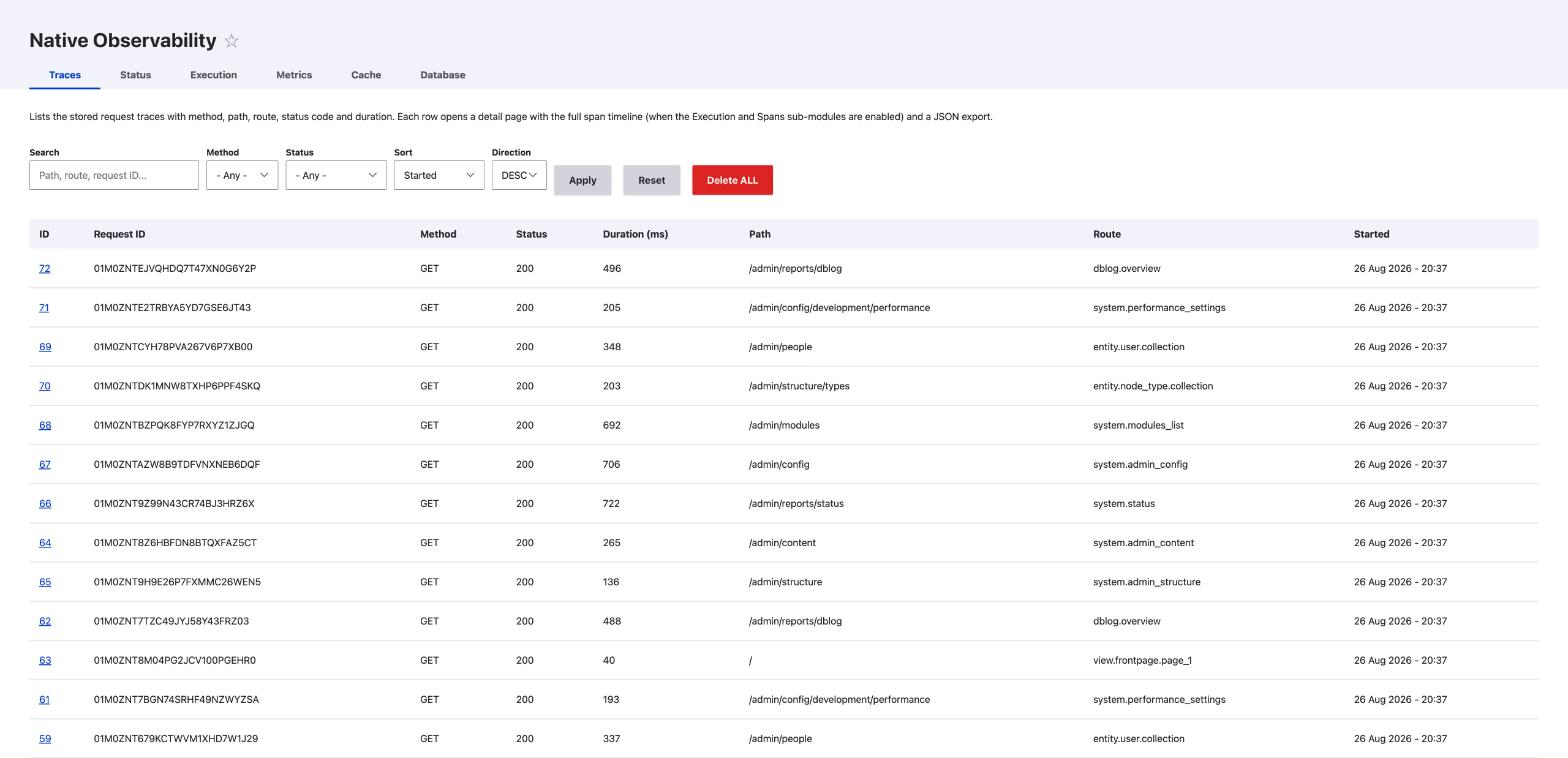
Open /admin/reports/native-observability. The page renders a filterable, sortable, paginated
table built by TraceListController::list(). Filters live in the query string and are applied
through TraceStorageInterface::search():
search: free-text search across the columns the storage backend indexes.status_code: exact HTTP status code.min_duration_ms/max_duration_ms: duration bounds.sort/direction: sort column (started_atby default) and direction (DESCby default).
Each row links the trace ID to the detail page. The filters form also exposes a Delete all
action, visible only to users with delete all native observability traces.
Trace detail view
Click a trace ID, or open /admin/reports/native-observability/trace/{id} directly. The page
shows request metadata (request ID, method, path, route, status code, duration, start/end
timestamps, user ID, client IP) and the stored JSON payload, pretty-printed when it parses as
valid JSON.
The stored path is redacted before it is written. Reset links and cancel links lose their hash and
timestamp, segments bound to sensitive route parameters are replaced, and so is any segment that
looks like a random token (20 or more URL-safe characters mixing letters and digits). The
replacement is [REDACTED]. The same value goes to the path column and to the payload. The
payload holds neither uid nor client_ip: both live in their own columns only. It adds
query_keys, the names of the query parameters in the request, never their values, whatever the
query mode. A name that is odd or looks like a token is shown as [KEY], and at most 20 names are
kept. An exception message is stored without the referer that core appends to routing errors,
without the literals and argument dump of a database exception, and with the query string of any
URL in the text redacted. It is cut to capture.exception_message_max_length characters. The body
of an OAuth token or registration request is never captured, whatever the body mode.
If the payload contains a parent_request_id (an AJAX or sub-request correlated to a parent
request), the page adds a link to that parent trace via
native_observability.trace_view_by_request_id.
To look up a trace by its correlation ID instead of its numeric primary key, use
/admin/reports/native-observability/trace/request/{request_id}. This resolves the trace
through TraceStorageInterface::loadByRequestId() and reuses the same detail view.
JSON export
From the detail page, or directly at /admin/reports/native-observability/trace/{id}/export,
download the trace as a JSON file. The response uses the stored payload when present; otherwise
it falls back to a minimal JSON object built from the trace's core columns. The filename is
trace_<request_id>.json, with any character outside [A-Za-z0-9_-] replaced by _.
Deleting all traces
/admin/reports/native-observability/traces/delete-all is a confirmation form
(TraceDeleteAllConfirmForm) gated by delete all native observability traces. Submitting it:
- Counts and deletes every row via
TraceStorageInterface::deleteAll(). - Dispatches
NativeObservabilityEvents::TRACES_DELETEDwith the deleted count, so submodules (spans, ECA bridge) can react and clean up related data. - Redirects back to the trace list with a status message reporting how many rows were removed.
This action cannot be undone.
Request log exclusion rules
Exclusion rules are managed at /admin/config/development/native-observability/exclusions,
gated by administer native observability exclusions. A rule matches a request on:
- HTTP method (
ANY, or one ofGET,POST,PUT,PATCH,DELETE,HEAD,OPTIONS). - Path match type:
exact,prefix, orregex. - Path pattern.
- Optional query conditions, one per line, in the form
key|operator|value(orkey|between|min|max). Supported operators:exists,missing,equals,regex,gte,lte,between. All conditions on a rule are combined with AND.
When a request matches an enabled rule, it is treated as if it never happened for observability purposes: no trace row, no linked spans, no metrics contribution.
List
The listing page (RequestLogExclusionListController::listing()) shows label, enabled/disabled
status, method, path match summary, condition count, and Edit/Delete operations for every stored
rule.
Add
/admin/config/development/native-observability/exclusions/add opens
RequestLogExclusionRuleForm with empty defaults. The form validates that a regex path pattern
and any regex query condition compile with preg_match() before saving.
Edit
/admin/config/development/native-observability/exclusions/{id}/edit opens the same form
pre-populated from the stored rule. The form also accepts prefill query parameters
(method, path_match_type, path_pattern, query_conditions, label, destination,
reactivate) so dashboard "Exclude from logs" and "Re-enable logs" shortcuts can deep-link into
it with a suggested rule and a safe return destination.
Delete
/admin/config/development/native-observability/exclusions/{id}/delete opens
RequestLogExclusionRuleDeleteForm, a standard confirmation form that removes the rule and
redirects back to the list.
flowchart LR
    A[Incoming request] --> B{Matches an enabled exclusion rule?}
    B -- Yes --> C[Request is skipped]
    C --> D[No trace row]
    C --> E[No linked spans]
    C --> F[No metrics contribution]
    B -- No --> G[Trace stored normally]
Rules are stored in the database (source of truth), normalized, and cached; the cache is invalidated whenever a rule is created, updated, deleted, enabled, or disabled, so normal request processing does not query the database on every request.