Report
The native_observability_report submodule provides the observability report builder. It is installed by the DASHBOARD preset (drush no:preset:dashboard).
Routes
| Route | Path | Permission |
|---|---|---|
native_observability_report.builder |
/admin/reports/native-observability/dashboard/report |
access native observability dashboard |
native_observability_report.settings |
/admin/config/development/native-observability/settings/report |
administer site configuration |
native_observability_report.export_html |
/admin/reports/native-observability/dashboard/report/export/html/{export_key} |
access native observability dashboard |
Report builder workflow
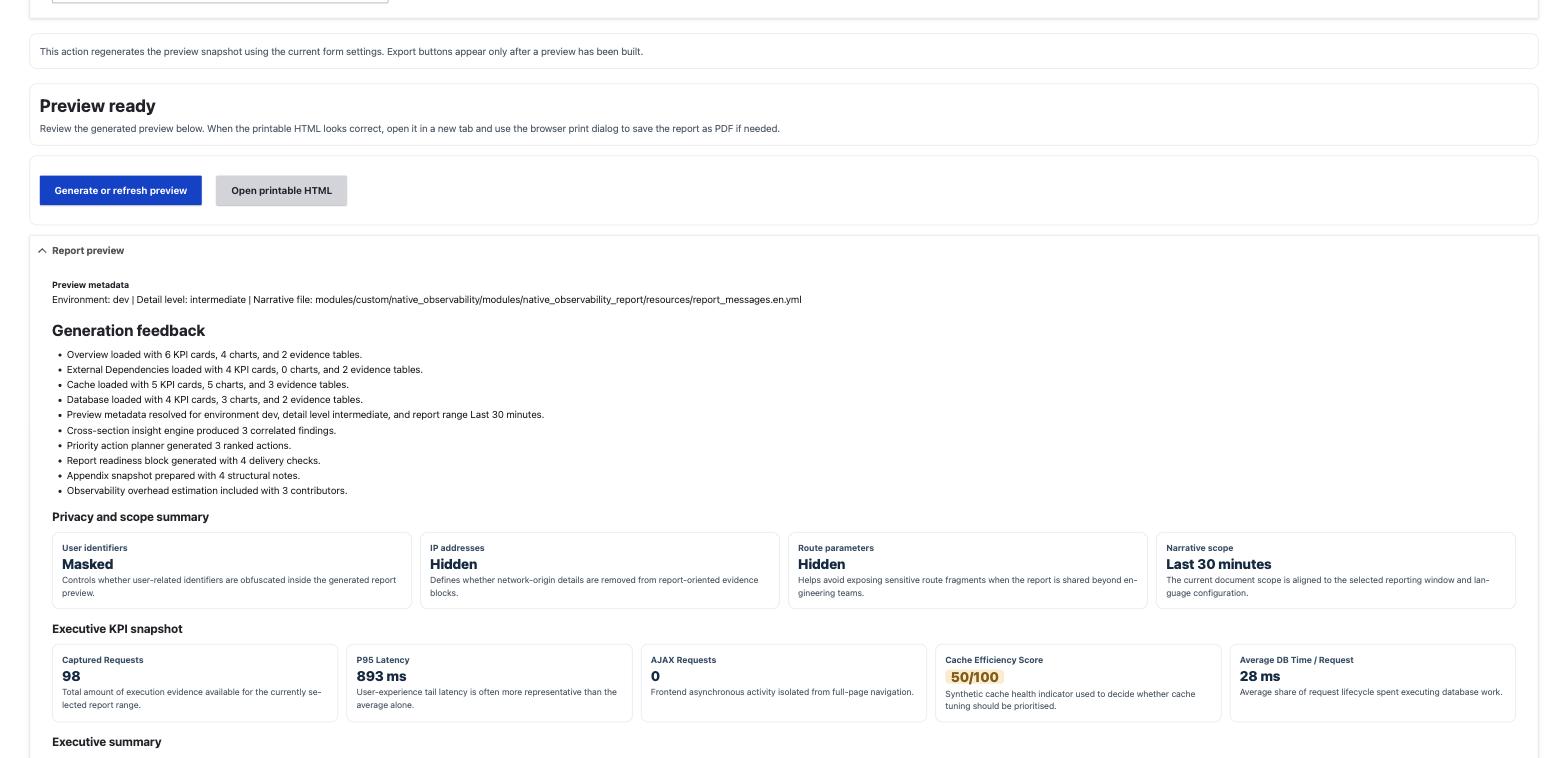
ObservabilityReportBuilderForm drives a three-step workflow: configure the report, generate or refresh a preview snapshot, then open the printable HTML export.
flowchart LR
    A[Configure scope and options] --> B[Generate or refresh preview]
    B --> C[Preview rendered in the form]
    C --> D[Open printable HTML export]
    D --> E[Save as PDF from the browser print dialog]
The module ships no server-side PDF renderer and depends on no headless browser or PDF library. Printable HTML is the only export format. PDF comes from the browser print dialog, on the reader's machine.
Composition settings
- Report title. Free-text title used in the document header.
- Detail level.
basic,intermediate, oradvanced. Controls how deeply each section explains its metrics and recommendations. - Narrative language. Language code used to select the narrative YAML file for section text.
- Observed time range. One of
15m,30m,1h,6h,24h,7d, matching the dashboard range keys. - Include Overview / Include Cache / Include Database. Toggle which dashboard sections are pulled into the document via
DashboardOverviewBuilder,DashboardCacheBuilder, andDashboardDatabaseBuilder. - Include observability overhead. Shows or hides the overhead disclosure section in this document only. It never changes the publication state or the stored measurement; see Observability overhead disclosure below.
Privacy options
Three toggles decide what survives into the exported document: mask user identifiers, hide IP addresses, hide route parameters. They are described in full, with their limits, in Privacy options below.
Branding
- Organization name, header text, footer text. Free-text fields printed on the exported HTML document.
Every field above starts from a site-wide default. The defaults are not repeated here: they live in one place, with their config keys and current values, in Report settings. Change them there to move the starting point for every new report; change them on this form to affect one report only.
Privacy options in the document
The report is the artefact most likely to leave the operations team: it gets exported to HTML, printed to PDF, and sent to a client or an auditor. Its privacy toggles decide what survives that trip.
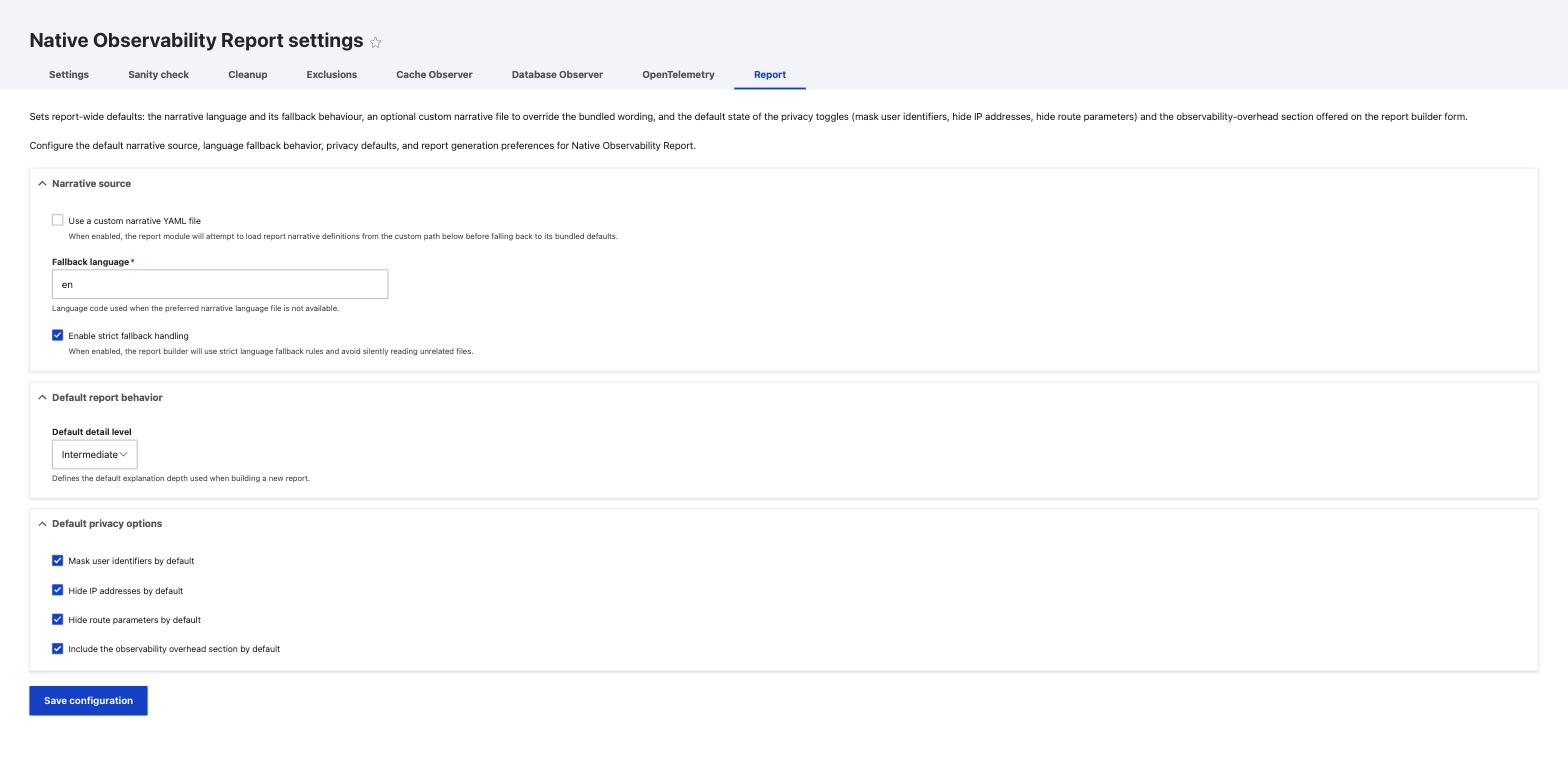
Defaults are set on the report settings form at
/admin/config/development/native-observability/settings/report, under
"Default privacy options", and each one can be overridden per report on the
builder form.
| Toggle | Config key | Default | Effect on the generated document |
|---|---|---|---|
| Mask user identifiers | default_mask_user_identifiers |
on | Obfuscates user-related identifiers inside evidence blocks. |
| Hide IP addresses | default_hide_ip_addresses |
on | Removes network-origin details from report-oriented evidence. |
| Hide route parameters | default_hide_route_parameters |
on | Strips route fragments such as node IDs and slugs, which often carry the identity of the content being viewed. |
| Include observability overhead | overhead.include_in_document |
on | Not a privacy control. Shows or hides the overhead disclosure section; it does not change what value that section shows. |
The preview shows the resolved state of the three privacy toggles and the time range in its "Privacy and scope summary" block (cards: User identifiers, IP addresses, Route parameters, Narrative scope) before you export anything, so you can confirm the posture without reading the settings form. The overhead toggle is not shown there.
Two limits worth stating plainly:
- These toggles operate on the report document. They do not change what is
stored in the trace tables. If an IP was captured in
fullmode, hiding it in the report leaves the full value in the database. Storage-side reduction is configured separately, in What is stored about people. - Stored paths are already redacted at capture time, see Paths. Hiding route parameters in the report removes what is left.
- The bundled narrative carries a standing notice
(
labels.privacy_notice) stating that sensitive operational data may be masked. It says data may be masked, not that it was: it is not evidence of the settings actually used.
Observability overhead disclosure
The report can state the cost of running this module alongside everything else it reports. That value has to carry its provenance: "measured on this server" and "typed into a form by whoever configured the report" are different claims about the same-looking percentage, and a reader cannot tell them apart from the number alone.
The section has three publication states, set on the report settings form
(/admin/config/development/native-observability/settings/report) under "Observability overhead
disclosure", stored as overhead.display:
| State | What the report shows | Label printed with the value |
|---|---|---|
| Hidden (default) | Nothing. No section is added to the document. | none |
| Value declared by the document author | The percentage and note entered on this form (overhead.manual_percent, overhead.manual_note) |
Value declared by the document author |
| Value measured on this server | The last measurement recorded by drush no:overhead:measure --record=<workload>, with the workload, pairs, absolute delta and verdict |
Value measured on this server |
Two rules hold regardless of which state is chosen:
- Whoever writes the document can always hide the section. The per-document "Include
observability overhead" checkbox on the report builder form (seeded from
overhead.include_in_document) turns the whole section on or off, in any of the three states, for that one document. What it cannot do is show the value with its label removed: the label is not an optional decoration, it is the fact being disclosed. - A declared value is not a measurement.
overhead.manual_percentis typed in by whoever configures the report: an estimate, a figure from a vendor datasheet, a number carried over from a previous report. The Value declared by the document author label says exactly that. Only a value produced by the bundled command and recorded with--recordearns the Value measured on this server label. See Measuring the overhead for what the command measures and how.
Setting the state to "measured" without ever recording a measurement is not an error, but it is not
silent either: the settings form shows a warning that no measurement is stored on this environment,
and the generation form shows the same warning and drops the section from the document until one is
recorded. The stored measurement itself is unaffected by this toggle either way; switching the state
back and forth never deletes it. drush no:overhead:clear is the only thing that does.
Customizing the narrative and its translation
The report is not a table dump: every metric comes with prose that explains it. That prose lives in YAML, not in code, so it can be rewritten or translated without touching PHP.
How the file is structured
The bundled files are
modules/native_observability_report/resources/report_messages.en.yml and
report_messages.it.yml, around 540 lines each. The top-level shape is:
meta:
  language: en
  version: 1

document:
  executive_summary:
    overall: 'The report currently combines @section_count sections, @chart_count charts, and @kpi_count executive KPIs...'
    overview: 'Overview status is @status with a score of @score/100. Tail latency is currently @p95.'
  labels:
    report_title: 'Native Observability Report'
    privacy_notice: 'Sensitive operational data may be masked or excluded according to the selected privacy options.'
  detail_levels:
    basic: 'Basic'
    intermediate: 'Intermediate'
Placeholders use the @name form and are substituted with computed values.
Keep them intact when translating: a sentence that loses @p95 loses the
number it was written to introduce.
Adding a language
ReportNarrativeLoader resolves the file by swapping the language segment of
the filename. Given a base path ending in .<lang>.yml, it builds candidates
for the preferred language first, then for the fallback language, then falls
back to the bundled report_messages.en.yml.
To add a language, copy a bundled file, rename the language segment, and translate the values:
cp modules/native_observability_report/resources/report_messages.en.yml \
   modules/native_observability_report/resources/report_messages.de.yml
Editing files inside the module directory means your work is overwritten on the next module update. For anything you intend to keep, use a custom narrative file instead.
Keeping the languages in step
The bundled files are peers: the same 318 leaf keys and the same 12 placeholders. A language that is missing a key does not fail: the loader falls through to the fallback language and then to the bundled English, so a gap shows up as one English paragraph in an otherwise translated report, which is easy to miss. Compare the key sets rather than the files:
ddev drush php:eval '
$leaves = function ($d, $p = "") use (&$leaves) {
  $o = [];
  if (is_array($d)) { foreach ($d as $k => $v) { $o = array_merge($o, $leaves($v, $p . "." . $k)); } }
  else { $o[] = $p; }
  return $o;
};
$dir = \Drupal::service("extension.list.module")->getPath("native_observability_report") . "/resources/";
$a = $leaves(\Symfony\Component\Yaml\Yaml::parseFile($dir . "report_messages.en.yml"));
$b = $leaves(\Symfony\Component\Yaml\Yaml::parseFile($dir . "report_messages.it.yml"));
print implode("\n", array_merge(array_diff($a, $b), array_diff($b, $a))) ?: "in step";
'
A key the report builder reads MUST exist in the narrative file, not only as
the default argument of ReportNarrativeLoader::getValue(). A key that lives
only in PHP renders its English default in every language, and no narrative
file can override it, the language mechanism is bypassed for that string
without any error to show for it.
Using a custom narrative file
On the report settings form, under "Narrative source":
- Tick Use a custom narrative YAML file.
-
Set the path in
custom_narrative_file_path, ending in.<lang>.ymlso the language swap works, for exampleprivate://native_observability/narratives/report_messages.en.yml.NarrativePathValidatoraccepts only three locations, and rejects anything else before the file is read:private://native_observability/narratives/public://native_observability/narratives/- the
native_observability_reportmodule directory
private://is only among them on a site that has a private file system configured; without one it resolves to nothing and drops out of the list.Paths containing
../segments are rejected, as are stream wrappers other thanprivateandpublic,phar://among them. A path outside these locations is not a path the report builder will load, however readable it is to the web server. A rejected path is logged with the roots that were allowed, and the report falls back to the bundled file rather than failing. 3. Set Fallback language (fallback_language, defaulten) to the language used when the preferred one has no file. 4. Decide Enable strict fallback handling (strict_fallback, default on).
Custom paths are tried before the bundled files, and the bundled English file always remains the last candidate, so a missing or unparsable custom file degrades to the shipped wording instead of producing an empty report.
strict_fallback controls how hard the loader tries when the preferred
language is missing. With it on, the loader will not silently read a file for
an unrelated language; with it off, it widens the candidate list. Leave it on
unless you have a specific reason: a report that quietly renders in the wrong
language is worse than one that falls back to English visibly.
You do not need to translate the whole file to start. Keys you leave out fall through to the next candidate, so a partial file is a valid file.
HTML export
Generating a preview stores the full preview payload in the private tempstore collection native_observability_report, keyed by report_<uid>_<timestamp>. The Open printable HTML action links to native_observability_report.export_html with that key as {export_key}. ObservabilityReportExportController::exportHtml loads the stored snapshot and renders it through ObservabilityReportDocumentBuilder::buildHtmlDocument. Requesting an export key that is missing or expired returns a 404.